top of page
Mobile App
Download the App to make and change class bookings, waitlist yourself in full classes, and receive alerts when a place comes available for you.

Step 1
Scan the QR code OR click this link (from your mobile phone) to download the Spaces by Wix app
Step 2
Enter this code: ZD9IOV
Step 3
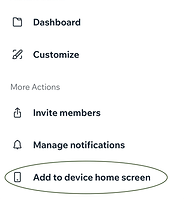
When you are on the Arakoon Yoga Studio page, click on the 3 dots on the top right of the screen and choose Add to device home screen at the bottom of the list

Step 4
Click on the 3 dots at the bottom right of the screen, then choose "Share". Scroll down and click on "Add to Home Screen. Click Add.

Complete!
You should now have the Arakoon Yoga Studio App on your Home Screen.
bottom of page